

Capture worklogs as work happens. Automated time tracking in Jira gives finance and managers data they can trust without nagging the team.
How logging hours helps PMO directors: The actuals behind every finance decision and capacity call you have to defend

Time tracking shows how every hour of your team’s effort was spent. Your roadmap shows what you planned to deliver. Your time logs show what actually happened.
As a PMO Director, your job is to connect funding decisions to actual delivery effort. That becomes much easier when you capture effort clearly and consistently. When time tracking lives in scattered spreadsheets or only partially in Jira, you’re working from fragments instead of the full picture.
This article shows how better time tracking gives you portfolio evidence you can stand behind.
Projects rarely fail all at once. They slip a little at a time, and most times, these slips go unnoticed when you don't track hours. Here's what tends to happen when your team doesn't track time.
A toll gate is the review where you decide whether to release a project’s next round of funding. It depends on whether the project burns budget faster than it delivers value, and you answer that with actual hours set against actual results.
Without those hours, you get an estimated time of how long a project took to complete. The project looks like it’s on track for three reviews, but then it’s marked as behind schedule at the last minute.
The real hours are what let you catch that early and cut it. High performers do exactly that: Tempo's 2026 State of SPM report found high-performers cancel around 8 percentage points more projects than their peers because they spot weak projects sooner. When you manage based on estimates instead of in real time, you’re more likely to keep funding a project that should have been stopped.
Some engineering work counts as CapEx, a capital expense finance spreads across several years, versus OpEx, the cost you book in the same year. To claim it, finance must show an auditor exactly which hours went into building the software.
Proving those hours is where it falls apart. The auditor asks which engineers worked on the feature you’re capitalizing and for how many hours. Without time logged against each work item, finance rebuilds the story from memory and estimates. Auditors flag that kind of reconstruction as a risk.
To play it safe, finance undercounts, so the company capitalizes fewer hours than it legitimately could.
Strategic drift is when work moves away from your priorities while your last quarterly review still says everything is on track. It builds up between reviews.
More than half of enterprises update their plans only once a quarter or once a year, according to the Tempo State of SPM report. That means a portfolio can drift for 90 days before anyone looks at it.
Logged hours are what close that 90-day blind spot. When your team tracks time against each work item, you can see effort landing on the wrong initiatives in week one, not at the next review.
Without that record, the drift stays invisible until someone reconstructs the picture – often by hand. At large-enterprise scale, that misalignment can cost around $260 million a year in lost value for an organization with $880M in strategic spend.
When resource plans live in separate spreadsheets, nobody sees the total load on each person. Key engineers end up overbooked, and you still can’t tell finance what an initiative really costs because the hours aren’t tied to it.
For PMO directors, time tracking earns its keep as evidence, the hard kind you can take to finance and leadership. Here’s where that evidence matters most.
Advanced planners see ROI or strategic value on 81% of their projects, compared to 45% for less mature teams, according to Tempo’s 2026 State of SPM report. The difference is that they see where effort and money are going early and cut weak work before it burns another quarter of the budget.
To make that kind of call at a toll gate, you need actuals: The hours your team logged. That means logging time against the work as it happens so the numbers are ready when you walk into the review.
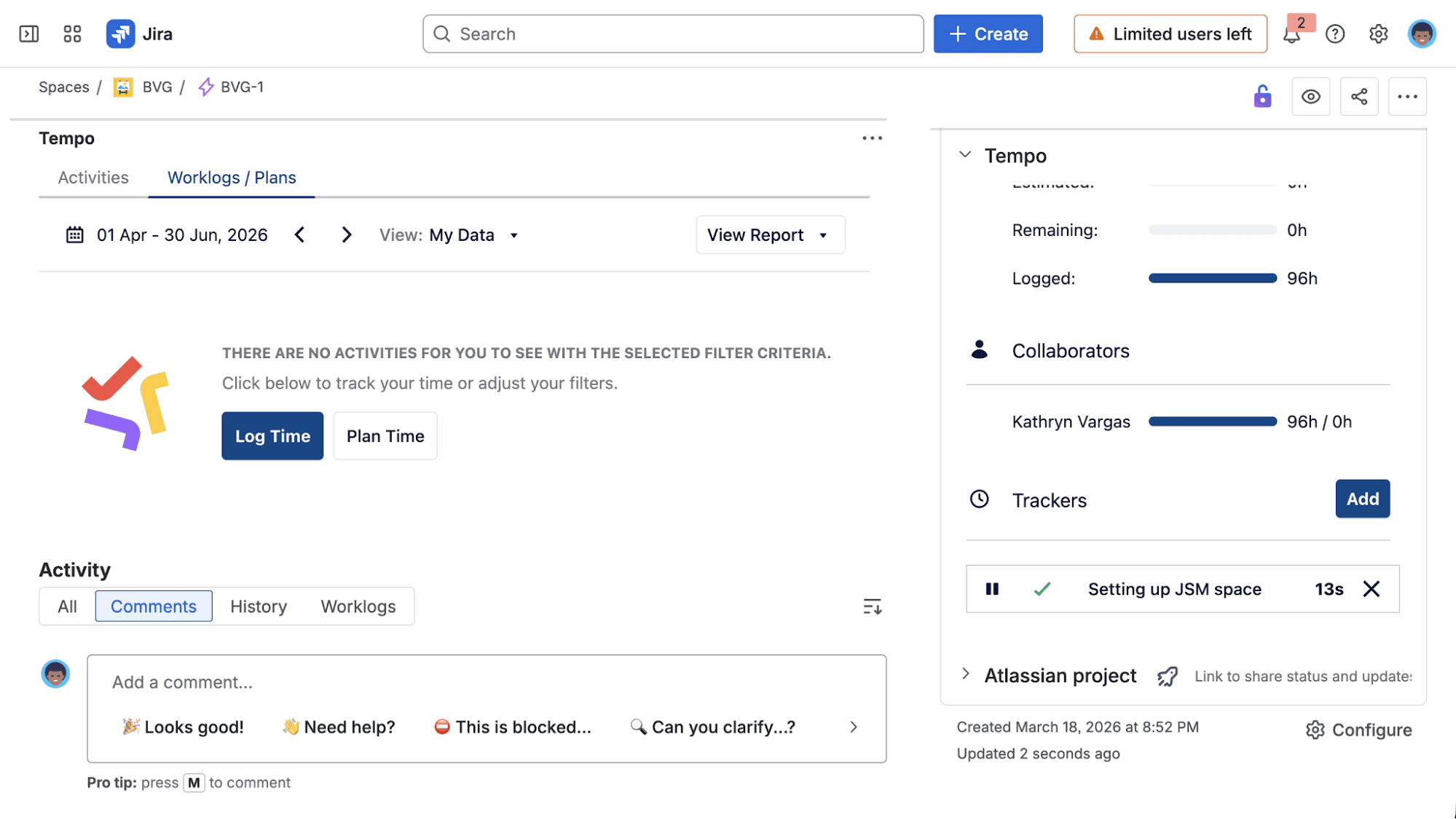
With Tempo Timesheets in Jira, people log time on the Jira issues they're already working on, and you see where those hours went across the projects you own. The number you bring into a governance review is the same one the team logged.
At TransUnion, moving time tracking into Jira let them see where hours went throughout their project. “For the first time ever, because everything’s in this central system, I’ve got 95% of the company managing all their work in Jira,” said John Rager, VP Enterprise Transformation.
Finance has to prove every capitalized hour to an auditor, and the proof is your time data. If the record is shaky, the claim is too.
It works both ways. Log too few hours as CapEx, and you claim less than the work generated. Log too many, and the auditor flags it. Finance takes the heat either way, but your teams built the record they're defending.
A clean record means every hour logged against the exact work item, with an approval step afterward.
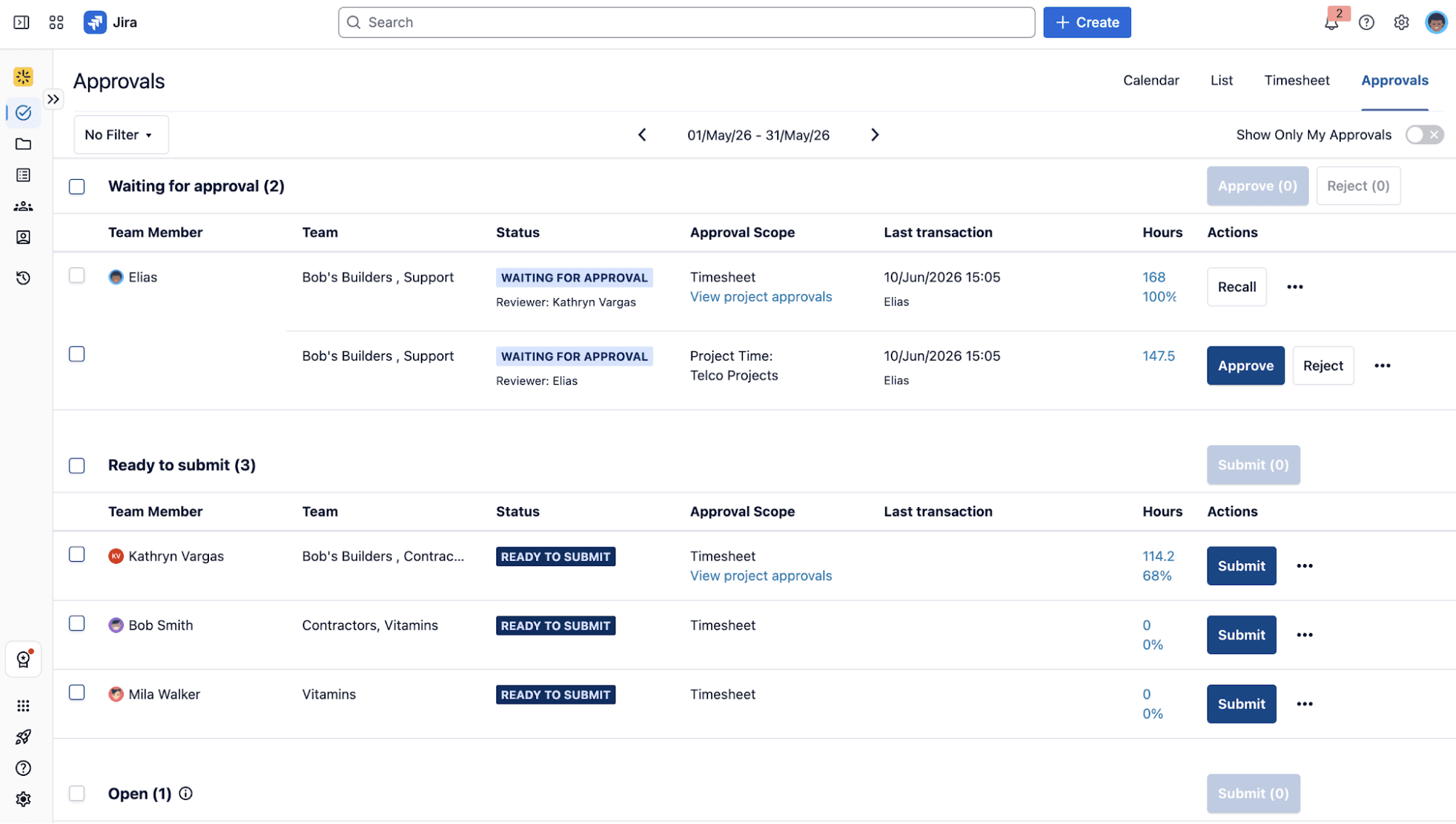
That's what Timesheets gives you: Your team logs each hour against its Jira issue, and finance pulls the CapEx and OpEx from those hours.
Before Tempo, SiriusXM's finance team burned hours every close reconciling reports that didn't agree.
"Tempo has helped us collaborate more effectively with finance and deliver sharper insights into capitalization, budgeting, and project performance. The most significant value has been in financial reporting accuracy – we achieved 99% alignment between Timesheets data and our general ledger," said Jamie Stanley, Senior Technology Program Management Support Analyst at SiriusXM.
This one comes down to timing. Compare the hours you planned against the hours needed to complete the work The moment the two diverge, you know that you need to revisit the project.
Say a migration was scoped at 200 hours. Halfway through, the team has logged 180. That scope creep can only be spotted if hours are logged in real time.
If you're like the 46% of enterprises that update their plans only once a quarter, then the money's already gone by the time you notice.
Timesheets is built for real-time tracking, so you can catch initiatives that are going off course.
Pluxee uses Timesheets to track time across 29 countries. It's how they flag a project heading toward a missed deadline before it actually misses.
On paper, someone might look free to take on more work because they've been assigned fewer projects. In reality, they're working nights to keep up, because those projects are more time-consuming than the task count suggests.
Logged hours are what let you see the actual time spent on each assignment. When an engineer is logging 50-hour weeks, they’re already maxed out, and you avoid adding more projects to their backlog.
In Timesheets, every person's hours are tied to the work they did, so you can staff next quarter accurately. Škoda Auto uses this for both resourcing and audits. "Tempo helps us gain insight into work progress and resource allocation to support operational decisions," said Martin Sahula, Expert Coordinator, Group Software Delivery at Škoda Auto, where process audits are routine.
Think about how much of your PMO's time goes into building reports instead of actually governing. Most of that work is putting together the numbers, digging through systems to reconstruct where the hours went. If the record already exists and you can query it, month-end stops being a rebuild and turns into a quick pull. You get that time back and the budget that went with it.
The trick is capturing the data cleanly the first time. People should log where they actually work, with approvals happening right there. That's how Timesheets works, since it lives inside Jira. The record exists as soon as someone logs an hour, and approvals happen in the same place.
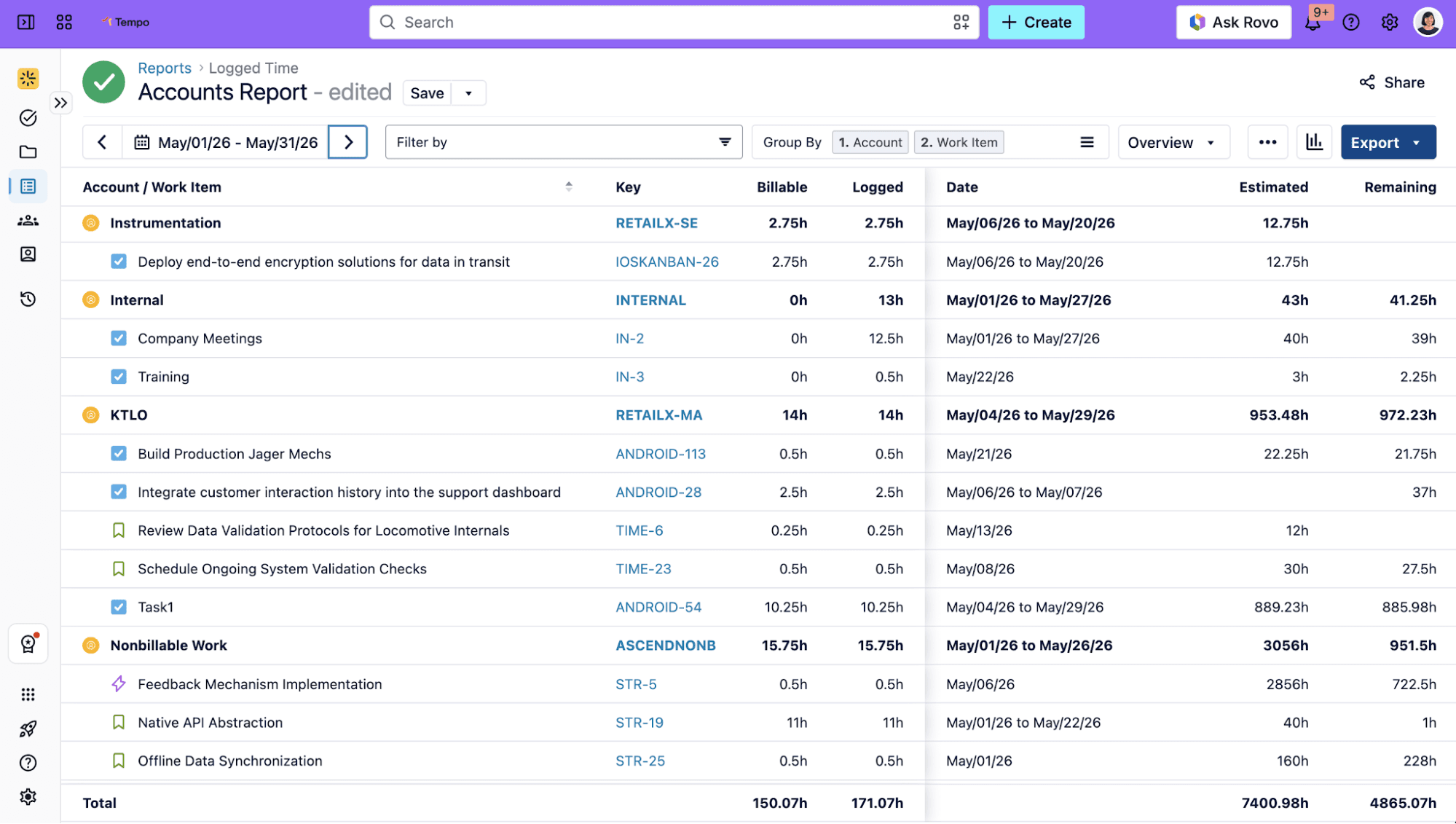
TIMETOACT GROUP, whose staff had been keying worklogs into Jira, SAP, and spreadsheets by hand, saved more than 10,000 hours a year after it connected time data to its finance systems. "It was a step-change towards operational excellence," said Sascha Wadenpohl, Chief Delivery Officer at TIMETOACT GROUP.
That’s a fair concern. In the American Psychological Association's 2023 Work in America survey, 56% of monitored employees said they felt stressed at work, compared with 40% of employees who weren't monitored.
To keep time tracking from feeling like surveillance, be clear about why you need the data. Logged hours help you plan work around the team’s real capacity, avoid overcommitting people, and give finance an accurate record of what their work costs.
Keep the process light. When people can log time in a few minutes from tools they already use, time tracking becomes part of the workflow rather than an administrative burden.
Once your team starts to log time, a few numbers tell you whether the data is any good and where the portfolio actually stands. Get a baseline for each, then watch which way it moves.
Start with your submission rate, because it decides everything else. If people aren't logging, every number below it is a guess, so check this before you look at anything else.
Then look at utilization: Of all the hours logged, how many went to work that counts, billable or capitalizable, versus overhead. That ratio tells you where your capacity is really going.
Planned-versus-actual variance shows you drift, one project at a time. It's the distance between the hours a project was scoped for and the hours it takes. When that distance widens, look at that project.
Your capitalizable hours ratio is the one finance cares about. It's the share of logged hours they can defend as CapEx. When you watch it, you know what you're handing them before close.
Approval cycle time is how long it takes for capital-hour and timesheet approvals to clear. Slow approvals are the bottleneck, and it's the one TransUnion fixed when it went from a quarter's wait down to days.
You don't have to roll this out across the whole portfolio to know if it's worth it. Pick the one place that already hurts. For most PMO Directors, that's capitalization, where finance is piecing the evidence together by hand, or the quarterly review, where you're defending the portfolio on estimates. Start there.
Timesheets live inside Jira, so your team logs against the issues they already work on, without changing how they work or moving them to a new system. Give it a quarter on a single portfolio. If that first clean report shows you what your old process couldn't, you'll know whether to keep going. And if it doesn't, you've risked almost nothing.
Tracking at the portfolio level lets you walk into the next review with a number behind every call you make.

Timesheets
The #1 time-tracking app for Jira. Timesheets seamlessly integrates with Jira and your existing workflows to help you track time for accounting, CapEx tracking, client billing, compliance, and more.
Start a Free TrialCouldn't find what you need?Go to our documentation
It gives you evidence you can defend. Time tracking turns "where did the effort go?" from a guess into a record you can stand behind at a toll gate (the review where a project earns its next round of funding). Those same hours show what finance can fund and where your capacity is really going.
Yes, and it's a big reason PMOs adopt it. To count engineering labor as CapEx (the capital expense finance spreads over years, versus OpEx, booked in the same year), finance has to show an auditor the hours your team spent on work. Log hours against each Jira issue in Timesheets, and finance pulls the split straight from them.
Yes. With Timesheets, your team logs against the Jira issues they already work on, so there's no separate system and no double entry. It also pulls suggestions from calendars and IDEs, which roughly halves the time it takes to log an hour.
Make it low-effort, and make the reason clear. Tell people plainly what it's for: funding their work and securing more funding, not policing their screens. Then cut friction: In Timesheets, teams can log straight from their calendars and IDEs they already use, so a worklog takes about half the time.
Capture worklogs as work happens. Automated time tracking in Jira gives finance and managers data they can trust without nagging the team.

Software engineering intelligence platforms read time logs, Jira, and Git as one dataset. See what they measure and where AI spend fits in.

New to Tempo Timesheets? This guide covers why time tracking matters in Jira and how to get the most out of Timesheets from day one.
See where your team's hours actually went. Slice Jira time data by status, issue type, project, or label to align effort with priorities.

AI attribution should pair human effort and AI spend on the same Jira work item, tracing every dollar to the work it delivered. Learn how we built it.
See how Timesheets brings estimated vs actual time into Jira with real-time reporting, dashboards, and portfolio rollups built for delivery teams.

OpEx and CapEx tracking basics can help reduce your company’s bottom line, balance project budgets, and identify cost-cutting opportunities.
Measure how long Jira issues take to close, broken down by status. The resolution time report turns workflow drift into a number you can act on.

Knowing the status of work is just as important as knowing when it will finish. See an aggregate of how long work takes for future estimation.

















